Live Selling on Facebook and TikTok in Tunisia: Prepare, Take Orders, Confirm
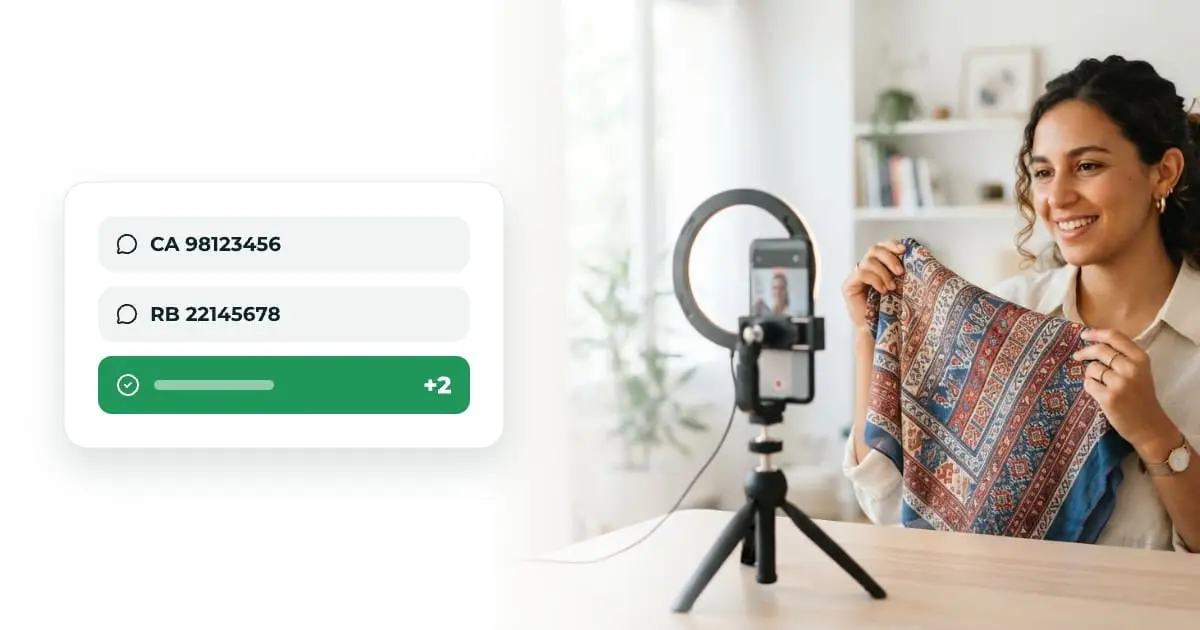
Live selling on Facebook or TikTok means showing your products in real time and taking orders in the comments. In Tunisia, the method that works comes down to four moves: a short code per item, one “code + phone number” comment per buyer, a confirmation call after the live, then shipping cash on delivery.
In short: prepare a product list with a code for each item, check that your account can go live (Facebook: 60 days and 100 followers; TikTok: 18 years old), ask for “code + number” in the comments, turn each buyer into an order, call to confirm, and only ship what is confirmed.
Why sell live rather than through posts?
A post shows a frozen product; a live answers questions while the customer hesitates. You show the fabric, the size on a person, the colour under real light, and you answer “yes, there is still a 40” on the spot. That is why live selling works for clothing, cosmetics, home decor and limited stock drops.
The downside is operational. A successful live produces hundreds of mixed comments: buyers, questions, greetings. Without a method, some orders get lost in the feed, and some of the ones you do find are refused on delivery.
| Channel | What it does well | Where it struggles |
|---|---|---|
| Posts + messages | Visible for a long time, easy to share | One conversation per customer, slow replies |
| Online store | Customers order on their own, any time | You have to bring traffic to it |
| Facebook / TikTok live | Demonstration and urgency, many orders at once | Orders scattered in comments, impulse buys to confirm |
A live does not replace your store: it creates order peaks, and the store takes orders the rest of the time. To move from social media to a store, see selling on Instagram and Facebook in Tunisia.
What are the requirements to go live?
Check them before you announce your first live, not on the day.
| Platform | Published requirements | Source (checked 18 October 2026) |
|---|---|---|
| Account created at least 60 days ago; Page or professional-mode profile with at least 100 followers; for a Page, access that lets you create content | Facebook Help “Go live on Facebook”; Meta for Developers gives 10 June 2024 as the launch date | |
| TikTok | Be at least 18 to host a LIVE (raised from 16 to 18 on 23 November 2022) | TikTok Newsroom, 17 October 2022 |
For TikTok, we found no minimum follower count in the official pages we checked; the app tells you whether LIVE is available on your account. Facebook also notes that in some countries teens under 18 must turn on the ability to go live themselves.
How do you prepare a live that sells?
- Pick 10 to 20 items. Enough to keep the pace, not so many that customers drown. Check the real stock of each, size by size.
- Give each item a short code. Two to five characters, unambiguous:
CA,ROBE12,PANT-NOIR. Put it on a label visible on screen while you show the product. - Set prices including delivery, or state the fees clearly. A surprise on the total is the first cause of refusals with cash on delivery.
- Announce the live 24 hours ahead, in a story and a post, with the time and two or three star products.
- Pin the ordering rule as a comment: “To order: code + phone number. Example: CA 98123456”.
- Plan a second person if you can: one presents, the other reads comments and answers questions.
How do you take orders in the comments?
The “code + number” rule does all the work. A buyer who writes CA 98123456 gives you the item and a way to call back. Handle the other cases after the live:
| Comment | What is missing | What to do |
|---|---|---|
CA 98123456 | Nothing | Call to confirm size and address |
2 CA or CA x2 | The number | Message privately to ask for it |
98123456 alone | The item | Call back and ask what they wanted |
| ”How much?”, “Available in 38?” | It is a question | Answer live, then repeat the ordering rule |
Do not confirm an order live (“noted!”) without having recorded the code and number: that is the promise that gets forgotten and that the customer holds against you later.
How does Yalla Souk turn comments into orders?
Yalla Souk’s live selling reads the comments of your lives in real time; it never posts on your page. It is enabled on request through support, and your number of lives per month and the cap on comments captured per live are shown when you start a capture.
- Connect your platforms in “My Lives”: your Facebook Page, and your TikTok account by its username.
- Start the live on Facebook or TikTok, then start the capture in Yalla Souk, with an optional title (for example “Spring drop”). Comments arrive within seconds.
- Link your products to the session and set the product being presented. Comments that name no product are attached to the one you are showing.
- Follow the buyers. AI sorts each comment into purchase intent, uncertain purchase, question or chat, and the “Buyers to follow up” list groups one line per buyer.
- Create the order from the comment: name, phone, product, variant, quantity and payment method. AI suggests the product and quantity read in the comment; you check before creating.
For “code + number” lives, the Live codes screen works without AI: you enter your item codes, and every viewer who commented a code or a number becomes one line, even if they wrote the code in one comment and the number in another. Explicit quantities (2 CA, CA x2) are recognised, and so are Arabic digits. Three tabs separate buyers: Ready to call (code and number), No phone and No code; the list refreshes every 5 seconds during the live and exports to CSV. Phone detection targets Tunisian mobile numbers.
Every order created from a live arrives as pending, like a website order: it goes through the same confirmation, the same anti-fraud rules and the same carrier handover.
How do you confirm and deliver after the live?
Live orders are impulse buys: confirm them fast, the same evening or the next morning.
- Call the “ready to call” buyers first, in comment order.
- Read back the item, the size and the total price including delivery, then check the address with a landmark. The full flow is in our order confirmation call script.
- Then message the buyers without a number privately.
- Ship only confirmed orders. With cash on delivery, a refused parcel costs the round trip; see the cash on delivery guide for choosing a carrier and return fees.
- Post a recap of the items still available with your store link: latecomers order on their own.
How much does a live really earn you?
Count per delivered order, not per comment. Take an illustrative example: 300 comments, 40 purchase intents, 30 confirmed orders, 25 parcels delivered. Only the last number pays, and it is the one to track from one live to the next. Work out your margin per delivered order, delivery and returns included, with the margin calculator, and if you sponsor the live announcement, set the budget with the ad budget calculator.
On Yalla Souk, the store is free forever and you pay per order received, from 0.300 TND down to 0.090 TND by volume, with no commission on your sales; the first 200 orders are free. Details are on the pricing page.
Sources
- Facebook Help: Go live on Facebook (checked 18 October 2026)
- Meta for Developers: Live Video API, new requirements from 10 June 2024 (checked 18 October 2026)
- TikTok Newsroom: Enhancing the LIVE community experience with new features, updates, and policies (17 October 2022, checked 18 October 2026)
Frequently asked questions
What are the requirements to go live on Facebook?
According to Facebook Help, checked on 18 October 2026, the account must be at least 60 days old and the Page or professional-mode profile must have at least 100 followers. For a Page you also need access that lets you create content. Meta has applied these requirements since 10 June 2024.
Do you need to be 18 to go LIVE on TikTok?
Yes. TikTok raised the minimum age to host a LIVE from 16 to 18 on 23 November 2022. The official pages we checked publish no minimum follower count: the app shows whether LIVE is available on your account.
How do you avoid losing orders in the comments?
Give each item a short code shown on screen and ask viewers to comment the code followed by their phone number, for example "CA 98123456". One code and one number per buyer is enough to call them back, even when the feed scrolls very fast.
Should orders taken during a live be confirmed?
Yes, even more than website orders. People comment fast and on impulse during a live. A call in the following hours checks the size, the address and the total price including delivery before you ship cash on delivery.
Does Yalla Souk post on my page during the live?
No. Yalla Souk reads the comments of your Facebook and TikTok lives in real time from the Page or account you connect, but nothing is posted on your behalf. You create the orders yourself, in the dashboard.
Does live selling with Yalla Souk work on Instagram?
Not today. Comment capture works for Facebook lives (from a Page) and TikTok lives. The feature is enabled on request through support.